
MFA Thesis
Thesis
- I. Introduction
- Abstract
- Introduction
- Thesis Topic
- Abbreviation of Terms
For the Deaf and Hard of Hearing community, the availability and presence of accessibility features on Virtual Reality games and experiences are inadequate. A search of the Virtual Reality games cataloged on Steam reveals that of the 3,000+ games available on it’s platform, only about .01% of those games have caption options available. Some of the more popular Virtual Reality games on the platform that boast subtitle accessibility support don’t feature in-game subtitles at all, instead relegating the content to only appear in cutscenes. Though it is easy to say that the fault lies with the designers and developers, that is only a small part of the problem. The true problem, and one in which this study aims to solve, is that there currently exist no clear set of rules or guideline that governs designing for Virtual Reality accessibility in the gaming space. Through this study, a series of guidelines will be created that will highlight different tools, features and best practices that can be used to make Virtual Reality gaming accessible for all.
Based on the review of scholarly literature and empirical research data, a profile will be created on the needs of Deaf and Hard of Hearing gamers in Virtual Reality. The findings of that data will be applied to a controlled Virtual Reality playground made to test and apply solutions to their accessibility needs. Ultimately by the end of this study, a set of detailed guidelines with practical game examples, in which game developers can use and apply, will have been created. This is all to ensure the next generation of Virtual Reality gamers are included in the fun. Developers need access to a set of uniform guidelines and tools that will aid in the production of accessibility features for this new platform of Virtual Reality.
As to begin the spotlight on accessibility in entertainment, it is important to note the exact figures for how many people in the world suffer from some form of Hearing Loss. According to the World Health Organization [1] over 5% of the population around the world suffers from a degree of hearing loss. Though one might think 5% of the population isn’t that bad of a figure, consider the fact that 5% of the population accounts for over 400 million people. With such a large community of people being affected by this issue, a concerted effort has been made around the world to make many forms of entertainment and media accessible to members of said community.
In the years since the inception of traditional digital entertainment, creating content that is accessible to members of the Deaf and Hard of Hearing community has been a focus point for developers everywhere. Entertainment is best when everyone is included on the fun. Though initially vague in implementation, the iterative process of developing accessibility features has greatly improved over the years and allowed virtually every form of entertainment to be viewable members of the larger Deaf community. Features such as subtitles, closed captioning, TTY support are just some of the accessibility options that can be found in many products such as computers, film, TV, and traditional Video Games. With most new pieces of entertainment technology that has been created in recent years, it has been a relatively simple process to integrate features to make the resultant product or software accessible. The inception of Virtual Reality, however, has turned that process on its head, as developers the world over are struggling to find ways to implement these features in a responsible manner. If one was to play some of the more popular Virtual Reality games in 2019, such as Vader Immortal and Moss, they’d see that there are varying disparities with how accessibility features are implemented in the game.
Though there’s no clear standard for how subtitles and closed captions features are implemented between these two games, a look at some other Virtual Reality products shows that these issues are not localized just to these two games. Virtual Reality games and products the world over are struggling to find a system of standards for how they implement accessibility features it their game. There are many factors that contribute to the lack of accessibility features that go far beyond simply developers forgetting to include the content. Issues of the Vergence-Accommodation Conflict [2], point of interest conflicts, and non-uniform guidelines for accessibility features are just some of the many issues developers can face when developing in their products. This paper will serve the role of conducting research and examining different tools and solutions for creating accessibility features in Virtual Reality gaming. This will ultimately culminate in solutions and recommendations for implementing popular products, such as subtitles and closed captions, while also exploring new innovative solutions for handling accessibility for the Deaf and Hard of Hearing in Virtual Reality.
Current accessibility features available on Virtual Reality games and experiences are inadequate. To ensure the next generation of Virtual Reality gamers are included in the fun, developers need access to a set of uniform guidelines and tools that will aid in the production of accessibility features for this new platform
For the purposes of this paper, the following terms will be abbreivated at every instance hereforth to improve ease of readability. Refer to the chart below for both a list of the proper term it's abbreviated counterpart.
| Proper Term | Abbreviation |
|---|---|
| Hard of Hearing | HoH |
- B. Methodology
This paper will begin by first listing and detailing some of the major issues that plague the Virtual Reality ecosystem when it comes to handling accessibility for the Deaf and Hard of Hearing. This information will be gathered primarily through research secondary research sources such as scholarly reviews and articles. Once information on the major accessibility issues in VR have been established, the focus will then shift to examining some of the ways in which accessibility is handled in other mediums, including traditional gaming. Synthesizing information on the accessibility practices of the entertainment media, traditional console as well as learning the tools used by the Deaf and Hard of Hearing in real life will go a long way in establishing a system for accessibility in VR. From this research is where most of the theories and methods for how to solve and innovate on accessibility features for the Deaf and HoH will be created.
In tandem with this research method I will also be looking into some of the techniques designers are currently using to make games more accessible, as well as exploring new technology that can be acquired to improve accessibility. These theories will of course need an environment to test the efficiency, as well as a method for verifying whether or not the proposed solutions are effective. To address this, the next phase of the project will involve creating a robust virtual environment for testing features, as well as founding a focus group of Deaf and Hard of Hearing individuals to verify the effectiveness of the testing models. As it is the most robust and portable Virtual Reality device on the market, the Oculus Quest will be the primary device where any proposed solution will be tested and implemented. At the end of this paper, a series of best practice guidelines, an interactive showcase demo, as well as final thoughts on improving game accessibility for the Deaf will have been created.
- C. Issues and Limitations of Virtual Reality
It would be easy to use traditional console games as a benchmark example of how Virtual Reality games can implement accessibility features, but to say that these systems are a one-to-one correlation would fundamentally incorrect. While some of the traditional standards and guidelines for accessibility can certainly be implemented in this system; the issue at hand is not whether the solutions can be implemented but rather how. The current state of VR as it’s designed leaves developers with a host of technical issues that have yet to be resolved or accommodated for. The Vergence-Accommodation Conflict, no dedicated GUI overlay and the problem of tracking captions in a fully immersive 3D space are just some of the technical issues that prevent accessibility features in VR games. This section will explore in detail some of the major technical issues that serve as a barrier to integrating deaf accessibility options on the system.
One of the main issues when developing accessible products in VR is the issues of the Vergence-Accommodation Conflict or VAC. The Adrienne Hunter’s medium.com article “Vergence-accommodation conflict is a bitch...” explores the issue of VAC as an issue how the human eyes naturally focus on an object, and the complications that arise with VR from having to include a display screen in-between the display object. As stated by Hunter [2], “ ...the way that the lenses of your eyes focus on an object is totally separate from the way that your eyes physically aim themselves at the object you’re trying to focus on.”. In VR users are required to first look at a display screen before focusing on objects further away in the virtual space, which can often lead to eye strain. [fig 3.1.1]
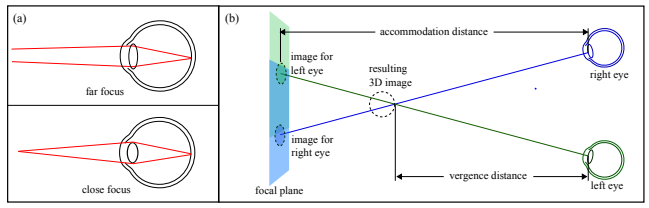
[fig 3.1.1 Representation of vergence accommodation conflict.]
In the time since this article’s publishing, VR has undergone several hardware changes to the point where users have begun to see a mitigation in the severity of the VAC effect. Improvements in display quality, as well as making the displays more rounded help accommodate for the eye strain that plagued earlier devices. In spite of all of the advances however, the VAC effect will still manifest itself if users are required to look at objects close to the screen, while also focusing on moving objects further away. While this next statement will require more user testing; this issue is one of the main reasons why having accessibility options like captions displayed directly on the device screen, as would normally occur in console games, is not a viable option. As a result of VAC developers have found it difficult figuring out ways to allow end-users to look at and adjust to new text without causing too much strain on the eyes.
While the Gamasutra article by Ian Hamilton, "How to Do Subtitles Well, Basic and Good Practice" [4] breaks down the issues and concerns regarding subtitles in traditional gaming, the author had a very pointed observation on the issue of captioning in VR. In the article, the author specifically notes, "There is a really significant issue with subtitling/captioning in VR - the general lack it...". That simple note, however brief, is largely indicative of the current situation in VR gaming right now. A glaring example of this issue can be seen in the AAA VR Game, “Vader Immortal”. In this game there is an accessibility feature that is supposed to enable visual feedback for the hard of hearing. Upon playing the game however users realized that those features were inadequate, as many users reported that the game was still inaccessible to them even with the feature turned on . The issue of captioning in Virtual Reality has many layers, but the greatest issue that plagues developers most is the concern of where to place the subtitles. Unlike the traditional captioning method of console games, where the main display camera is to one position on the screen, Virtual Reality is a medium where the position of the display camera changes rapidly from minute-to-minute. [fig3.1.2]
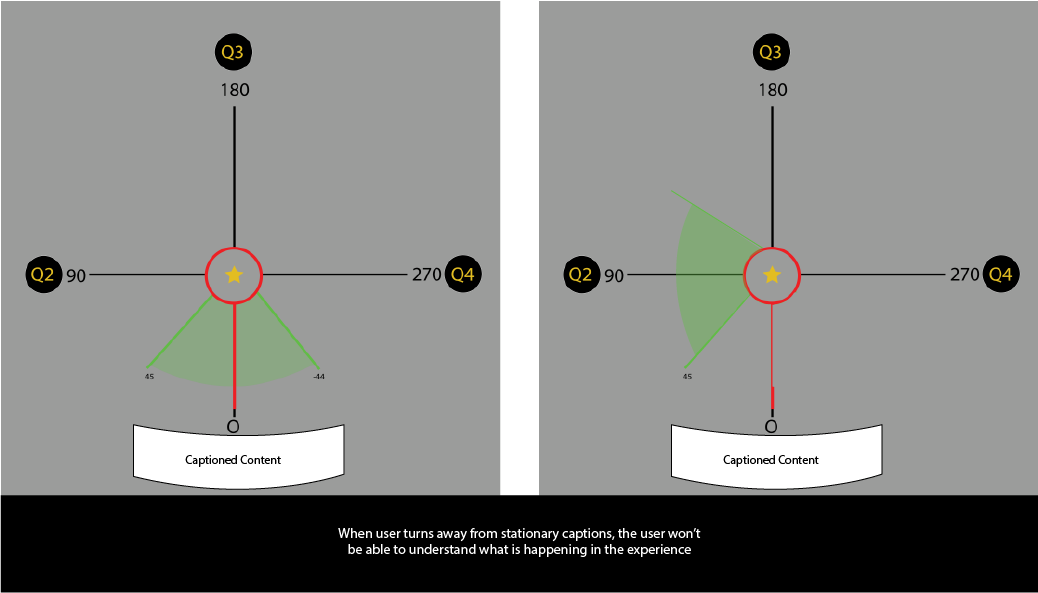
[fig 3.1.2 - Graphic showcasing issue of what happens when user turns away from stationary captions in VR]
One can’t simply place captions at the center of the screen, as it would be unreasonable to expect that the end-user will only be focused on that position for the entire experience. The next best solution would be to have the text float in front of the viewer, but even that solution has the potential for position and obstructional conflicts. The captioned text can’t be too close to the end-user, lest they suffer from VAC, and it’s also can’t block the viewer from seeing the game content behind it. Figuring out how to handle subtitles and caption content in Virtual Reality is an interesting problem. While many developers have implemented different solutions for handling this issue, there unfortunately exist not clear standards, which is in large part due to the issues listed above.
Now to explore one of the gravest issues affecting the barrier of entry for the Deaf and Hard of Hearing getting into VR, the issue of captioned information. Before diving into this topic, is worth noting that in entertainment media there exists a clear distinction between the purpose of subtitles and closed captioning. 3PlayMedia.org’s article on the Ultimate Guide to Closed Captioning [5] states that subtitles only include translation for spoken word, as it was made assuming the viewers could ear but doesn’t understand the language. Closed captioning however were made assuming the viewer is Deaf or Hard of Hearing and include descriptions of sounds in the environment, in addition to spoken text, in it’s translations. An example of this distinction can be found in the figure below [fig 3.1.3].
.png)
[fig 3.1.3 - Difference between Subtitles and English CC]
Now one might wonder why is captioning important or relevant to VR? The reason for its relevance is that, much like in the real-world, the Deaf and Hard of Hearing are often times unable to gain information on their environment as a result of their lack of hearing. Now this issue could simply be solved by just adding on captions to whatever solution that is implemented for subtitles in VR, but that would only solve a part of the problem. At issue is not only what ambient sounds in the environment being played, but also the position and origin of those sounds. For example if a large boulder fell and began coming at the player, sure the use of vibrations would inform a Deaf player something is amidst, but without knowing it’s location the player would frantically look around until the find the source. When playing in a 3D Virtual environment, the Deaf and HoH would be at a significant disadvantage if they don’t receive captioned information on not only the sound, but also the location of said sound. Implementing and developing new solutions for displaying captioned information is a must if developers want to make their products accessible to the Deaf and Hard of Hearing.
To increase the reach of Virtual Reality to those of the Deaf and Hard of Hearing community, the barriers that obstruct developers from adding accessibility features must be overcome. One silver lining is that for game developer and the deaf communities alike when addressing accessibility is not a matter of if the solutions are possible, but rather how the solutions should be implemented. While Virtual Reality is another platform for playing games; the fundamental mode of interaction when using this platform requires users to interact with virtual objects in a similar manner to which they would with objects in real life. Since this platform very closely mimics the real world by way of interactions, the examination of real world Deaf/HoH products should be taken into account. To that end, the next section will address some of the ways in which accessibility is handled in the real world, while also exploring the history of many accessibility solutions.
- D. Research
- I. Research Preface
- II. Deaf Accessibility in Entertainment
This paper will begin by first listing and detailing some of the major issues that plague the Virtual Reality ecosystem when it comes to handling accessibility for the Deaf and Hard of Hearing. This information will be gathered primarily through research secondary research sources such as scholarly reviews and articles. Once information on the major accessibility issues in VR have been established, the focus will then shift to examining some of the ways in which accessibility is handled in other mediums, including traditional gaming. Synthesizing information on the accessibility practices of the entertainment media, traditional console as well as learning the tools used by the Deaf and Hard of Hearing in real life will go a long way in establishing a system for accessibility in VR. From this research is where most of the theories and methods for how to solve and innovate on accessibility features for the Deaf and HoH will be created.
No discussion on the impact and reach of accessibility products can begin without first discussing the many organizations responsible for making these products available and popularized in the mainstream. The hard work of various different organizations, associations and companies have created a space for issues to be addressed and solutions to flourish, without their support there would be no accessibility. A critical example of organizations working to improve accessibility options is found everyday in the closed caption features found in traditional and online media. According to the National Association for the Deaf, up until the late 1990s it wasn’t a requirement for media to have closed captioning for any dialogue in the United States [6]. That all changed with the passage of the Telecommunications Act of 1996, which required all media to be closed captioned and translated before being aired in any medium. Since the passage of this act, many organizations such as BBC and Netflix [6] have released various guidelines that govern how closed captioning should be displayed when consuming media. The figure below lists some of the major guidelines that must be followed in traditional media entertainment [6] [fig 4.2.1].
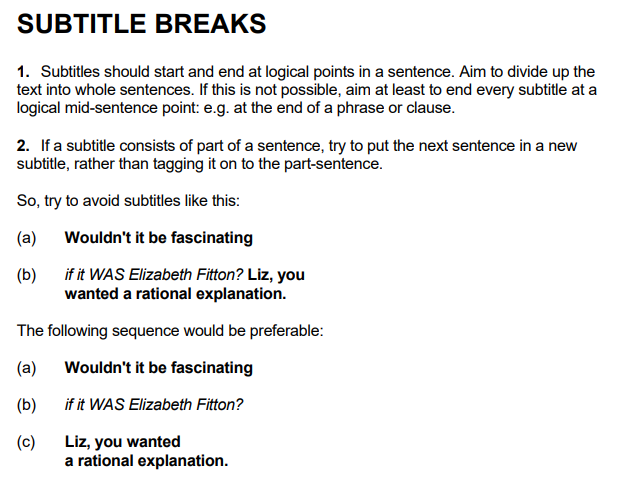
[fig 4.2.1] From BBC
As a general rule for closed captioning, the text should be large enough for viewers to read and text content should not exceed 32-36 characters per line. There are addition specification for font type, size, and background color that all serve to increase the readability of captions across multiple display types.These guidelines not only applies to traditional display media, like television and film, but can also apply to games when making captioning for spoken dialogue.
In a similar vein, the caption display options for movie theaters have followed a similar path of regulation and innovation. Much like captioning for display media, the captions for theaters were not a requirement until exceedingly recently. While the guidelines on closed caption content and character limitations per line is exceedingly similar to that of traditional display media, the methods of which these guidelines are implemented is truly fascinating. Unlike traditional display media where closed captioning is displayed on a television or monitor for a specific viewers, movie theaters displays are made for a diverse audience which often don’t require captioning. One of the most popular solutions implemented by movie theaters throughout the United States is the use of Private Display Units [6].
Private Display Units were invented to give Deaf and Hard of Hearing users an individualized caption system that they can adjust to their liking. Under the umbrella of Private Display Units exist two innovative solutions for sending captioned content to individual Deaf users, Seat Mounted Displays and Eyewear Displays. With Seat Mounted Displays the captioned text exists in a screen window that can be moved around to the user’s liking. Eyewear Display technology on the other hand sends captioned text directly to a specialized headset wirelessly, and projects the captions directly onto the glasses. Though the caption for the Eyewear Displays were initially fixed to only one part of the display; new headsets, like the Smart Caption Glasses created by Epson, feature adjustable caption where users can change everything from the size to position of the caption.
By borrowing from the techniques of the entertainment industry, some of the issues that affect VR gaming can be solved. The guidelines from BBC and Netflix on captioning dialogue for consumption is notable for providing a clear standard of rules and guidelines to follow to create legible content. Most consequential and relevant to the issues of VR gaming, is the technologies used by movie theaters to provide individualized captions to the audiences who require it. The concept of floating, adjustable caption devices is one that definitely has a stake in the future of accessible solutions for Virtual Reality.
- III. Deaf Accessibility Technology - Haptic Feedback
From assistive hearing devices to TTY, within the realm of accessibility there exists many products that the Deaf and Hard of Hearing use on a daily basis. While products used to amplify sound are typical solutions to find when discussing accessibility solutions, equal consideration in this content should be given to other ways in which technology is used to promote accessibility. In particular the use of flashing lights, signals and vibrational technology become highlighted in recent years as showcasing new ways in which the Deaf and HoH can receive information about their environment. As Virtual Reality by extension blurs the line between the real world and the virtual one, perhaps then some of the tools used in real life can become practical accessibility features in this emerging medium. For this section we’ll take a deep dive in examining the different ways in which these bits of technology is used in the real world.
The first piece of technology that will be focused on is that of Vibrotactile Feedback. Perhaps due to a natural adaptation mechanism to reduced hearing, those of the Deaf and Hard of Hearing community have been found to have a heightened awareness to minute changes in vibrational frequencies [8]. As an example, from feeling vibrations members of the Deaf community can tell how heavy a falling object is, make a rough approximation of the position at which the object fell and can even differentiate whether the vibration was from an object or person. This sensitivity to vibrations has enabled the Deaf and Hard of Hearing community to gain information about their environment that they otherwise wouldn’t be able to understand through sounds alone. For this reason, researchers and innovators alike have looked for different ways in which vibrational technology can be leveraged to improve accessibility.
One of the most popular ways in which vibrational technology is used is through the use of VibroTactile, or Haptic, feedback. Many products on the market, such as mobile phones, electronics and video games, use vibrotactile feedback to provide low level interaction for the end user. Where haptic feedback truly shines however is in the accessibility features in modern flagship smartphones. Flagship smartphones companies Samsung and Apple have accessibility features built into their phones, like sound detectors that can alert users to the presence of different sounds such as the doorbell ringing or a baby crying [9]. The sound detector feature on these phones transforms the haptic feedback from a simple way to not disturb others or provide low-level feedback to being a Vibration Signalling System. This system is a great standard feature for the Deaf/HoH community as it allows them to gain more information about their environment through phones and other PDA devices.
To further expand on the use of vibrational feedback, Matthews, Fong and Mankoff paper on Visualizing Non-Speech Sounds for the Deaf gives insight to how Deaf users react to vibrations as cited in the paper, “... participant stayed aware of her surroundings with vibrations” and was quoted as stating “I use vibrations to feel grounded”[10]. Companies, such as CuteCircuit makers of the haptic feedback “SoundShirt”, have been looking for ways to use haptics as a way to help Deaf/Hard of Hearing users hear sound in a more profound way. There are several of VR companies hard at work on developing haptic body attachments to grant users a greater sense of immersion. As Dean Shibata, MD in an article published on WebMD “...found that deaf people are able to sense vibrations in the same part of the brain that others use for hearing”[10]. These tools should certainly be explored as a potential solution to improve the accessible reach of VR game.
The use of haptics is vital for Virtual Reality as it showcases a greater use for haptic feedback in games beyond dramatic effect. The technology and subject is a critical real-world example of how Deaf and Hard of Hearing can use and adapt different forms of feedback to improve sensory awareness and navigate through life. As for implementation into accessible options within VR, it grants great pause for developers to seriously consider how they can use haptic feedback to more thoroughly provide context about their worlds to the Deaf and Hard of Hearing.
- IV. Deaf Accessibility Technology - Visual Feedback
The Deaf and Hard of Hearing use visual feedback and iconography everyday in the real world to communicate with people around them. From lip-reading to fill in the blanks for missed words to the use of Sign Language, everything about life is told through visuals and images. Though haptic feedback and captioning options are critical in improving accessibility, visual feedback and iconography are some of the oldest and most critical ways inform Deaf/HoH users communicate with the world.As a result many industries have focused on finding ways to leverage icons as a way to improve accessibility for the community.
To spotlight some of the ways in which researchers have explored iconography as a mode of visualizing sounds, one needs to look no further than Tara Matthew’s paper, “Visualizing Non-Speech Sounds for the Deaf”[11]. In this article Matthews set out to explore the different ways in which design of peripherals can be used to aid in visualizing non-speech sounds. Matthews took special care to interview Deaf users to find out what Deaf users wanted to know about the sounds around them and some of the visual characteristics they prefer. From this study it is discovered that many Deaf users used a combination of small pda devices and other forms of electronic feedback to gain information about their environment. Some functional requirements specified as a result of this study including the following; a desire of Deaf users to identify what type of sound occurred, the history of said sound and Single Icon descriptions of sound [10]. The findings from Matthews provides critical insight into the exact needs many deaf people have when using visual feedback to gain information on their environment.
Video games and experiences have been great at including iconography as a successful mode of communication. Games that use hearing sound as a game mechanic, such as The Last of Us [fig 4.4.1], have also included x-ray features that help users see where sounds are coming from.
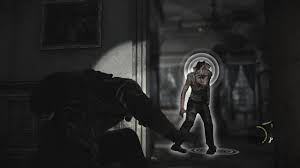
[fig 4.4.1 - The Last of Us - Focus hearing mode clearly shows enemy, as well as where sounds are coming from]
Other popular games like Fortnite feature a full Deaf Accessibility mode, in which icons and other visual forms of representation informs the player what objects and enemies are nearby. One game to take particular note of is Moss, as it is one of the few games in which the main character communicates primarily in ASL. As games are a visual medium, developers have been vigilant when it comes to including iconography in their products, this trend should continue onto VR gaming.
As Virtual Reality technology evolves, a new form of communication will inevitably open up by way of sign language integration. Games such as Moss and The Last of Us are notable for the way they bake hearing accommodations into their games. Developing a sound history is profound, as the creation of a feature such as that will greatly boost the accessibility of VR games. Deaf and Hard of Hearing people rely heavily on visual feedback in their day-to-day life to adjust for the information that they don’t get from hearing alone. Implementing more features that revolve around iconography and other forms of visual feedback will go a long way in improving accessibility.
- V. Current Practice in Deaf Accessibility for Gaming
The current state of accessibility in the Video Game and VR industry has been on rather shaky grounds for the past few years. For all of the strides that games like Marvel's Spider Man made in making games inclusive, there's always games like Spyro the Reignited Trilogy that falters in providing basic accessibility solutions. In the case of Spyro the Reignited Trilogy, the game got a great deal of heat for failing to include subtitles in the game for the first 4 months, closing the game off to an entire community of players. While that situation is indeed bad, the issue with accessibility doesn't always have to fall to an issue of games having subtitles vs. not having them. Even games with subtitles can create unintentional barriers for the Deaf/HoH community, as developers can sometimes make interesting design decision that often only make their subtitles that much harder to follow [see fig 4.5.1; 4.5.2].
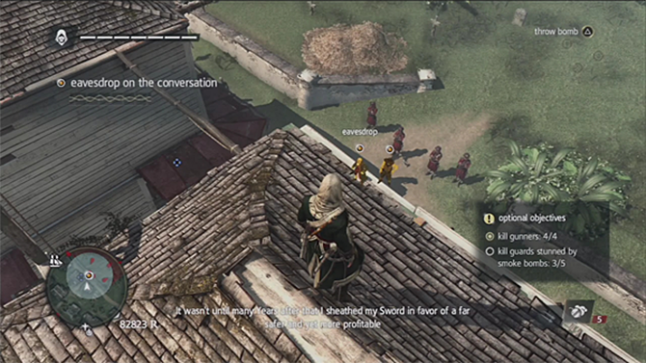
[fig 4.5.1 - Assassin’s Creed - Subtitle with shadow gets lost in image, making it hard to read]
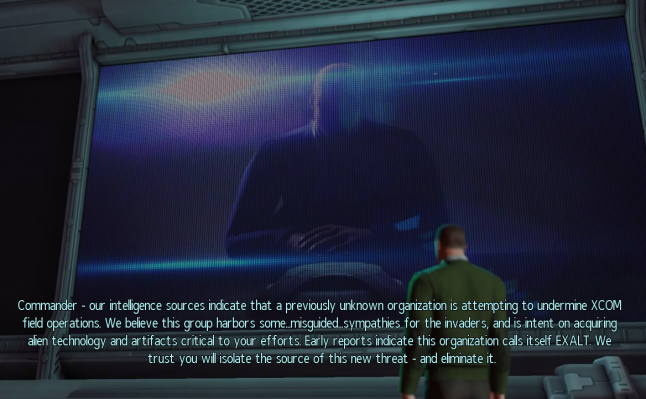
[fig 4.5.2 - XCON - Too much text makes content hard to read]
While the issue of incoherent accessibility options for the Deaf/HoH in gaming has been well documented, across multiple articles and forums, there does exist a silver lining. On the web there exists a great guideline on how to create accessibility features for games can be found on the Game Accessibility Guideline webpage [12]. For instance, according to these guidelines it is best to ensure that subtitles/captions are cut down to and presented at an appropriate words-per-minute for the target age-group. The reason for the age specification is because some people tend to read at a slower pace than others, so the speed by 0.2 seconds would give users the accommodation they need to properly play the game.This data point is great as the slowing down of subtitles can be another optional feature that is included in any subtitle customization menu. While this guidebook unfortunately doesn’t contain any information about creating subtitles for VR, the information presented in this guide will certainly be useful when it comes to checking guidelines in VR.
- E. Focus Group
Content on the focus group, and the resultant findings, will be updated in the next revision of this paper. Currently no data on the focus group exists.
- F. Reflection - Best Practice in Accessibility for Virtual Reality
- I. Best Practice Selection
- Creation of a proper system for the implementation trackable subtitles/captions in VR
- Creation of an single-icon caption system for visualizing sound in the environment Possible inclusion of sound history system.
- Exploring the usage of vibrational controller and peripherals as a means of detecting and locating sound. Creation of a system to handle this information.
- II. Rationale
- III. Prototype
- From analysing the research data, the best pathway forward to in creating accessible features in Virtual Reality is to focus on the following pathways :
In looking at the data for subtitles and closed captioning in VR, it was apparent that the issue had to do more with how to safely integrate captions as compared to developers just choosing to not include them. Traditional media and entertainment have laid the groundwork for what the exact text guidelines should be when implementing subtitles. The only issue that’s left to be solved is the exact method for how subtitles will be included in a VR system.
As for the single-icon caption, this option was selected based on two critical data points. The first point being that captions in traditional media is used to give non-verbal information about sounds in the environment. While having captions rest on the subtitle text bar is great, it is also important to remember that when immersed in a virtual world sound can come from all over the world. Closed caption as it is traditionally used is simply not enough to capture all of the information conceivable when playing a Virtual Reality game. When the gaps in technical solution fall, it was time to turn to real-life examples and use them as a guide. Recalling the use of PDA’s and other forms of iconography, it was determined that the best way to include captions for the possible sounds listed in a game was for art to imitate life. That’s where the development of a single-icon caption system comes into play.
The final best practice solution was determined because of how intuitive the use of vibrations already is for members of the Deaf and Hard of Hearing community. Since the expectation is that members of these community regularly use vibrations as a way of gaining information about the real-world, it is then appropriate to make the same expectations applicable to the virtual one.
Some solutions that have been found to be great to implement in Virtual Reality are that of adjustable floating captions. Click the link below to see a more detailed breakdown of solutions implemented on the Visuals page.
Click here view solutions in Visuals
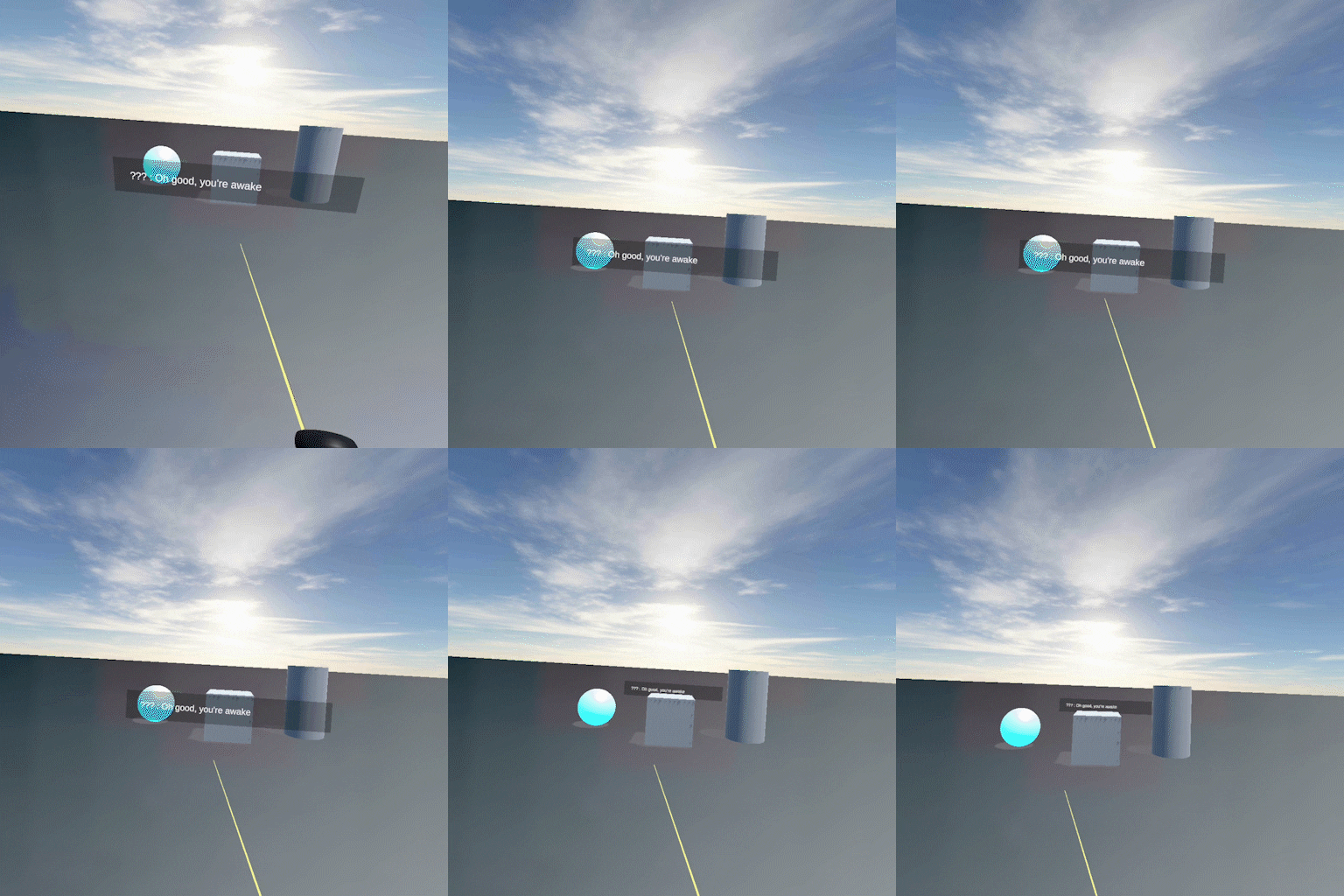
This figure shows captioned text that is attached to the VR headset. When the player moves, the subtitle text will track the player. Additionally the player is able to adjust the position and size of the captioned text through the opening of settings within the menu.
- Conclusion
Virtual Reality is an exciting new medium that offers players a brand new way to interact with games. Though there does exist some guidelines on how to create accessibility options for traditional console games, there exists no such guidelines for how to make accessible features for Virtual Reality. However from studying the best practices of older, more traditional console games, as well as examining the history of accessibility in the real world guidelines can be created. The exact method of which for implementing all of the best practices featured above is still a mystery. What is clear, however, is that once these practices have been implemented in more VR games, the world of VR will become accessible to the Deaf and Hard of Hearing Community.
- Works Cited
- Deafness and Hearing Loss
-https://www.who.int/news-room/fact-sheets/detail/deafness-and-hearing-loss - Vergence-accommodation Conflict Is a Bitch - Here's How To Design Around It.
Adrienne Hunter - https://medium.com/vrinflux-dot-com/vergence-accommodation-conflict-is-a-bitch-here-s-how-to-design-around-it-87dab1a7d9ba - “How to Do Subtitles Well.” Gamasutra Article,
https://www.gamasutra.com/blogs/IanHamilton/20150715/248571/How_to_do_subtitles_well__basics_and_good_practices.php. - “Closed Captioning & Everything You Need to Know About It.” 3Play Media,
https://www.3playmedia.com/resources/popular-topics/closed-captioning/#captioning. - “Closed Captioning Requirements.” National Association of the Deaf,
https://www.nad.org/resources/technology/television-and-closed-captioning/closed-captioning-requirements/. - Williams, Gareth Ford. “Bbc.co.uk Online Subtitling Editorial Guidelines V1.1 .” 5 Jan. 2009, pp. 1–37.,
http://www.bbc.co.uk/guidelines/futuremedia/accessibility/subtitling_guides/online_sub_editorial_guidelines_vs1_1.pdf. - Judith Harkins, Paula E. Tucker, Norman Williams, Jeff Sauro, Vibration Signaling in Mobile Devices for Emergency Alerting: A Study With Deaf Evaluators, The Journal of Deaf Studies and Deaf Education, Volume 15, Issue 4, Fall 2010, Pages 438–445,
https://doi.org/10.1093/deafed/enq018 - Klarreich, Erica. “Feel the Music.” Nature News, Nature Publishing Group, 27 Nov. 2001,
https://www.nature.com/news/2001/011129/full/news011129-10.html. - “Hearing Accessibility - IPhone.” Apple,
https://www.apple.com/accessibility/iphone/hearing/. - “Deaf People Can ‘Feel’ Music.” WebMD, WebMD, 28 Nov. 2001,
https://www.webmd.com/a-to-z-guides/news/20011128/deaf-people-can-feel-music. - Matthews, Tara, et al. Visualizing Non-Speech Sounds for the Deaf.
- “Game Accessibility Guidelines.” Game Accessibility Guidelines,
http://gameaccessibilityguidelines.com/full-list/.
- Works Cited
- Orero, Pilar, et al. Fun for All: Translation and Accessibility Practices in Video Games. Peter Lang Publishing Group, 2014.
- Downey, Gregory John. Closed Captioning: Subtitling, Stenography, and the Digital Convergence of Text With Television (Johns Hopkins Studies in the History of Technology). Johns Hopkins University Press, 2008.
- Waki, Ana L. K., et al. “Games Accessibility for Deaf People: Evaluating Integrated Guidelines.” Universal Access in Human-Computer Interaction. Access to Learning, Health and Well-Being Lecture Notes in Computer Science, 2015, pp. 493–504., doi:10.1007/978-3-319-20684-4_48.
- Kramida, Gregory. “Resolving the Vergence-Accommodation Conflict in Head-Mounted Displays.” IEEE Transactions on Visualization and Computer Graphics, vol. 22, no. 7, Jan. 2016, pp. 1912–1931., doi:10.1109/tvcg.2015.2473855.